
你是怎么理解 ES6 中 Promise 的?使用场景?
介绍
Promise,译为承诺,是异步编程的一种解决方案,比传统的解决方案(回调函数)更加合理和更加强大
在以往我们如果处理多层异步操作,我们往往会像下面那样编写我们的代码
doSomething(function (result) {
  doSomethingElse(
    result,
    function (newResult) {
      doThirdThing(
        newResult,
        function (finalResult) {
          console.log("得到最终结果: " + finalResult)
        },
        failureCallback
      )
    },
    failureCallback
  )
}, failureCallback)
阅读上面代码,是不是很难受,上述形成了经典的回调地狱
现在通过 Promise 的改写上面的代码
doSomething()
  .then(function (result) {
    return doSomethingElse(result)
  })
  .then(function (newResult) {
    return doThirdThing(newResult)
  })
  .then(function (finalResult) {
    console.log("得到最终结果: " + finalResult)
  })
  .catch(failureCallback)
瞬间感受到 promise 解决异步操作的优点:
- 链式操作减低了编码难度
- 代码可读性明显增强
下面我们正式来认识 promise:
状态
promise 对象仅有三种状态
- pending(进行中)
- fulfilled(已成功)
- rejected(已失败)
特点
- 对象的状态不受外界影响,只有异步操作的结果,可以决定当前是哪一种状态
- 一旦状态改变(从 pending 变为 fulfilled 和从 pending 变为 rejected),就不会再变,任何时候都可以得到这个结果
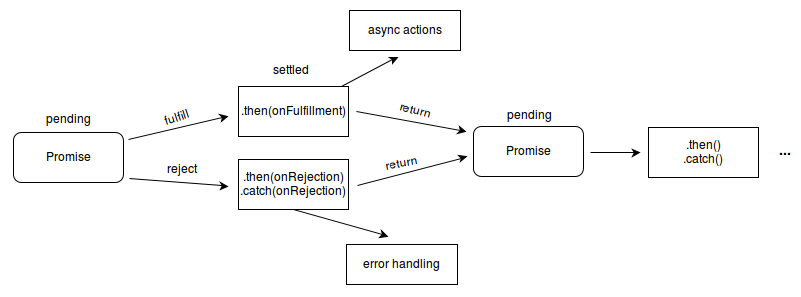
流程
认真阅读下图,我们能够轻松了解 promise 整个流程
用法
Promise 对象是一个构造函数,用来生成 Promise 实例
const promise = new Promise(function(resolve, reject) {});
Promise构造函数接受一个函数作为参数,该函数的两个参数分别是resolve和reject
- resolve 函数的作用是,将 Promise 对象的状态从“未完成”变为“成功”
- reject 函数的作用是,将 Promise 对象的状态从“未完成”变为“失败”
实例方法
Promise 构建出来的实例存在以下方法:
- then()
- catch()
- finally()
then()
then 是实例状态发生改变时的回调函数,第一个参数是 resolved 状态的回调函数,第二个参数是 rejected 状态的回调函数
then 方法返回的是一个新的 Promise 实例,也就是 promise 能链式书写的原因
getJSON("/posts.json")
  .then(function (json) {
    return json.post
  })
  .then(function (post) {
    // ...
  })
catch()
catch()方法是.then(null, rejection)或.then(undefined, rejection)的别名,用于指定发生错误时的回调函数
getJSON("/posts.json")
  .then(function (posts) {
    // ...
  })
  .catch(function (error) {
    // 处理 getJSON 和 前一个回调函数运行时发生的错误
    console.log("发生错误!", error)
  })
Promise 对象的错误具有“冒泡”性质,会一直向后传递,直到被捕获为止
getJSON("/post/1.json")
  .then(function (post) {
    return getJSON(post.commentURL)
  })
  .then(function (comments) {
    // some code
  })
  .catch(function (error) {
    // 处理前面三个Promise产生的错误
  })
一般来说,使用 catch 方法代替 then()第二个参数
Promise 对象抛出的错误不会传递到外层代码,即不会有任何反应
const someAsyncThing = function () {
  return new Promise(function (resolve, reject) {
    // 下面一行会报错,因为x没有声明
    resolve(x + 2)
  })
}
浏览器运行到这一行,会打印出错误提示 ReferenceError: x is not defined,但是不会退出进程
catch()方法之中,还能再抛出错误,通过后面 catch 方法捕获到
finally()
finally()方法用于指定不管 Promise 对象最后状态如何,都会执行的操作
promise
.then(result => {···})
.catch(error => {···})
.finally(() => {···});
构造函数方法
Promise 构造函数存在以下方法:
- all()
- race()
- allSettled()
- resolve()
- reject()
- try()
all()
Promise.all()方法用于将多个 Promise 实例,包装成一个新的 Promise 实例
const p = Promise.all([p1, p2, p3])
接受一个数组(迭代对象)作为参数,数组成员都应为 Promise 实例
实例 p 的状态由 p1、p2、p3 决定,分为两种:
- 只有 p1、p2、p3 的状态都变成 fulfilled,p 的状态才会变成 fulfilled,此时 p1、p2、p3 的返回值组成一个数组,传递给 p 的回调函数
- 只要 p1、p2、p3 之中有一个被 rejected,p 的状态就变成 rejected,此时第一个被 reject 的实例的返回值,会传递给 p 的回调函数
注意,如果作为参数的 Promise 实例,自己定义了 catch 方法,那么它一旦被 rejected,并不会触发 Promise.all()的 catch 方法
const p1 = new Promise((resolve, reject) => {
  resolve("hello")
})
  .then((result) => result)
  .catch((e) => e)

const p2 = new Promise((resolve, reject) => {
  throw new Error("报错了")
})
  .then((result) => result)
  .catch((e) => e)

Promise.all([p1, p2])
  .then((result) => console.log(result))
  .catch((e) => console.log(e))
// ["hello", Error: 报错了]
如果 p2 没有自己的 catch 方法,就会调用 Promise.all()的 catch 方法
const p1 = new Promise((resolve, reject) => {
  resolve("hello")
}).then((result) => result)

const p2 = new Promise((resolve, reject) => {
  throw new Error("报错了")
}).then((result) => result)

Promise.all([p1, p2])
  .then((result) => console.log(result))
  .catch((e) => console.log(e))
// Error: 报错了
race()
Promise.race()方法同样是将多个 Promise 实例,包装成一个新的 Promise 实例
const p = Promise.race([p1, p2, p3])
只要 p1、p2、p3 之中有一个实例率先改变状态,p 的状态就跟着改变
率先改变的 Promise 实例的返回值则传递给 p 的回调函数
const p = Promise.race([
  fetch("/resource-that-may-take-a-while"),
  new Promise(function (resolve, reject) {
    setTimeout(() => reject(new Error("request timeout")), 5000)
  }),
])

p.then(console.log).catch(console.error)
allSettled()
Promise.allSettled()方法接受一组 Promise 实例作为参数,包装成一个新的 Promise 实例
只有等到所有这些参数实例都返回结果,不管是 fulfilled 还是 rejected,包装实例才会结束
const promises = [fetch("/api-1"), fetch("/api-2"), fetch("/api-3")]

await Promise.allSettled(promises)
removeLoadingIndicator()
resolve()
将现有对象转为 Promise 对象
Promise.resolve("foo")
// 等价于
new Promise((resolve) => resolve("foo"))
参数可以分成四种情况,分别如下:
- 参数是一个 Promise 实例,promise.resolve 将不做任何修改、原封不动地返回这个实例
- 参数是一个 thenable 对象,promise.resolve 会将这个对象转为 Promise 对象,然后就立即执行 thenable 对象的 then()方法
- 参数不是具有 then()方法的对象,或根本就不是对象,Promise.resolve()会返回一个新的 Promise 对象,状态为 resolved
- 没有参数时,直接返回一个 resolved 状态的 Promise 对象
reject()
Promise.reject(reason)方法也会返回一个新的 Promise 实例,该实例的状态为 rejected
const p = Promise.reject("出错了")
// 等同于
const p = new Promise((resolve, reject) => reject("出错了"))

p.then(null, function (s) {
  console.log(s)
})
// 出错了
Promise.reject()方法的参数,会原封不动地变成后续方法的参数
Promise.reject("出错了").catch((e) => {
  console.log(e === "出错了")
})
// true
使用场景
将图片的加载写成一个 Promise,一旦加载完成,Promise 的状态就发生变化
const preloadImage = function (path) {
  return new Promise(function (resolve, reject) {
    const image = new Image()
    image.onload = resolve
    image.onerror = reject
    image.src = path
  })
}
通过链式操作,将多个渲染数据分别给个 then,让其各司其职。或当下个异步请求依赖上个请求结果的时候,我们也能够通过链式操作友好解决问题
// 各司其职
getInfo()
  .then((res) => {
    let { bannerList } = res
    //渲染轮播图
    console.log(bannerList)
    return res
  })
  .then((res) => {
    let { storeList } = res
    //渲染店铺列表
    console.log(storeList)
    return res
  })
  .then((res) => {
    let { categoryList } = res
    console.log(categoryList)
    //渲染分类列表
    return res
  })
通过 all()实现多个请求合并在一起,汇总所有请求结果,只需设置一个 loading 即可
function initLoad() {
  // loading.show() //加载loading
  Promise.all([getBannerList(), getStoreList(), getCategoryList()])
    .then((res) => {
      console.log(res)
      loading.hide() //关闭loading
    })
    .catch((err) => {
      console.log(err)
      loading.hide() //关闭loading
    })
}
//数据初始化
initLoad()
通过race可以设置图片请求超时
//请求某个图片资源
function requestImg(){
    var p = new Promise(function(resolve, reject){
        var img = new Image();
        img.onload = function(){
           resolve(img);
        }
        //img.src = "https://b-gold-cdn.xitu.io/v3/static/img/logo.a7995ad.svg"; 正确的
        img.src = "https://b-gold-cdn.xitu.io/v3/static/img/logo.a7995ad.svg1";
    });
    return p;
}

//延时函数,用于给请求计时
function timeout(){
    var p = new Promise(function(resolve, reject){
        setTimeout(function(){
            reject('图片请求超时');
        }, 5000);
    });
    return p;
}

Promise
.race([requestImg(), timeout()])
.then(function(results){
    console.log(results);
})
.catch(function(reason){
    console.log(reason);
});